Hull Spec Plaque
- Core Rule
- 1 Installed Module = Physical Ship Block + Captain's Order Card (Verified Official)
- Observed Categories
- Weapons, Defense, Utility, Cargo, Crew (Playtest / Demo-Observed)
- Grid Rebuilding
- Modules can be unslotted and rearranged between fights
- Module Health
- Durability; reaching 0 sets module to Disabled for the turn
- Armor Rule
- Zero Armor exposes both Hull and individual Modules to direct hits
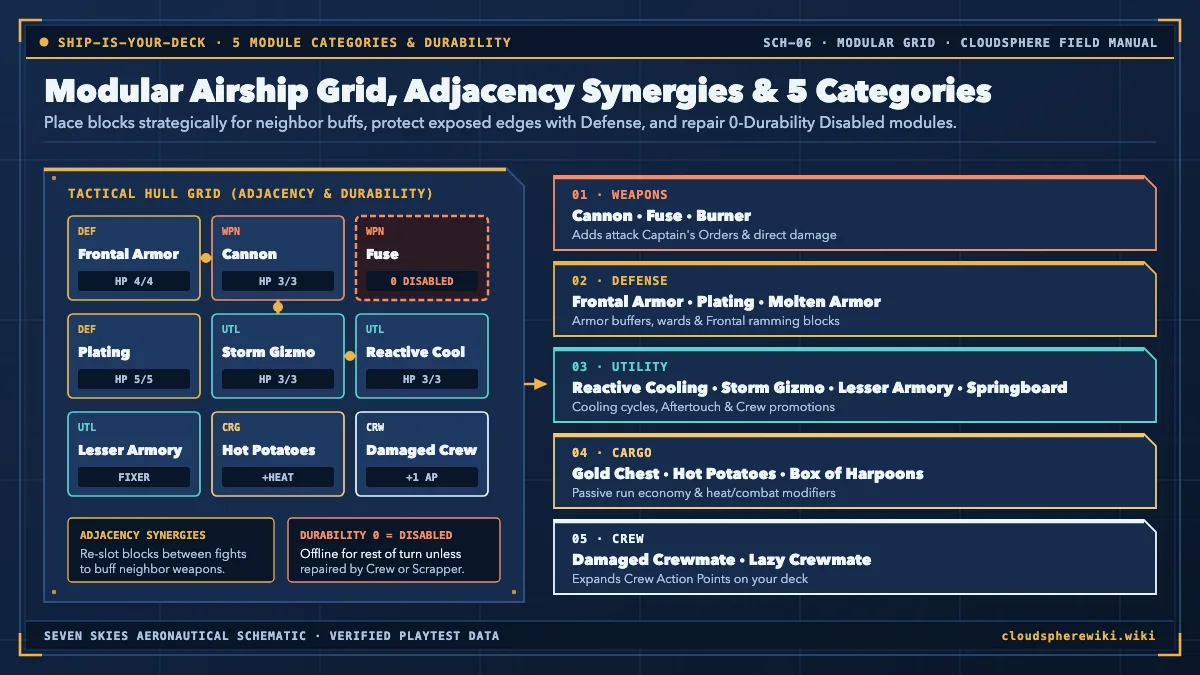
Cloudsphere, the single-player roguelike airship deckbuilder from Laki Studios (creators of Oaken), merges spatial ship construction with card-based tactics. Rather than drafting disconnected spells into an invisible pile, you assemble a floating vessel block by block on a tactical grid. Every piece among your Cloudsphere modules bolted onto the hull frame changes your ship's silhouette, its defensive profile, and the exact Captain's Orders shuffled into your hand each battle.
This reference breaks down how Cloudsphere modules power the ship-as-deck architecture across Steam Playtest 2 and the GOG Demo, separating confirmed official rules from playtest-observed behavior that may still be tuned before full launch.
How Your Cloudsphere Airship Becomes Your Combat Deck
According to Laki Studios' official Steam and GOG documentation (Verified Official), installing a module in Cloudsphere alters both your vessel and your combat deck at the same time:
- One Module, One Captain's Order: Each installed module on a Cloudsphere airship comes paired with a Captain's Order—a card played during turn-based combat to activate that system or trigger its battlefield effect.
- No Bloated Junk Piles Without Physical Cost: Because your Cloudsphere deck is literally your airship, adding another weapon or utility block expands both your grid footprint and your card draw pool. Conversely, pruning weak blocks tightens draw consistency while freeing physical space for heavier hardware.
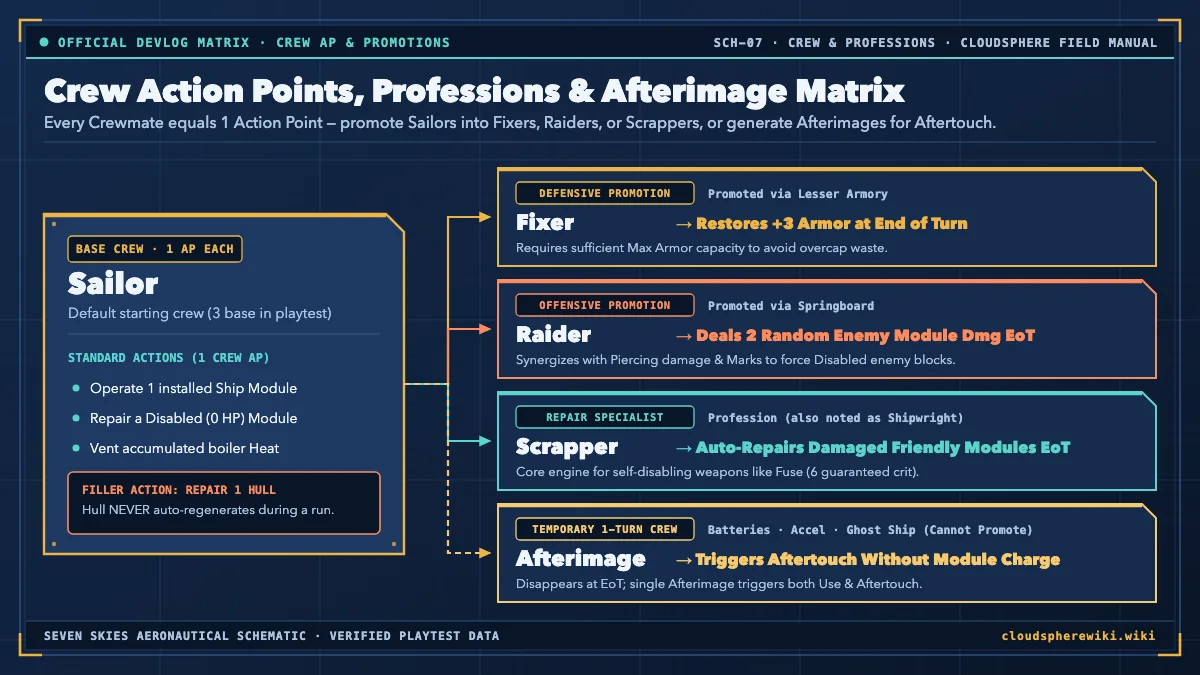
- Crew Activation Gate: Drawing a Captain's Order is only half the equation. Operating a Cloudsphere ship module normally consumes one Crewmate (your action points), meaning an oversized deck with too few hands aboard will stall out. See our Crew and Action Points breakdown for how Sailors, Professions, and Afterimages fuel module activations.
Five Categories of Cloudsphere Modules
While Laki Studios' Cloudsphere store overview highlights three primary combat roles—Weapons, Defensive Systems, and Utility Modules (Verified Official)—hands-on playtest coverage (Playtest / Demo-Observed) shows five distinct categories of Cloudsphere modules competing for space on your airship grid:
| Category | Role on Ship & Deck | Named Examples | Verification Tier |
|---|---|---|---|
| Weapons | Deal damage and add offensive Captain's Orders | Cannon, Tar Slingshot, Burner, Fuse | Fuse: Official; others: Playtest-Observed |
| Defense | Build Armor, ward sections, or enable ramming attacks | Plating, Frontal Armor, Molten Armor, Reinforced Decking | Playtest / Demo-Observed |
| Utility | Promote crew, generate Afterimages, cool Heat, or trigger storms | Lesser Armory, Springboard, Batteries, Storm Gizmo, Reactive Cooling, Lesser Forge, Overwired Module | First 4: Official; others: Playtest-Observed |
| Cargo | Provide passive run effects, economy, or temperature hooks | Gold Chest, Hot Potatoes, Box of Harpoons | Playtest / Demo-Observed |
| Crew | Add extra hands to operate modules and patch Hull | Damaged Crewmate, Lazy Crewmate | Playtest / Demo-Observed |
Several named Cloudsphere blocks illustrate how tightly these categories cross-pollinate:
- Fuse (Verified Official): A weapon module that, at the end of the turn, Disables itself to deal 6 damage with a guaranteed critical hit. On its own, Fuse creates a repair tax every round; paired with a Scrapper (or Shipwright) repair profession, that self-damage turns into repeatable burst output.
- Frontal Armor (Playtest / Demo-Observed): Doubles as both defensive plating and an offensive ram, letting you slam directly into hostile vessels to break their modules off piece by piece.
- Storm Gizmo (Verified Official): A utility module featuring Stormcall and Aftertouch, summoning a storm that strikes both your vessel and the enemy—rewarding captains who pair high Armor or spare Sailors with temporary Afterimages.
- Hot Potatoes (Playtest / Demo-Observed): A Cargo item whose passive continuously generates Heat, proving that Cloudsphere Cargo slots are active build levers rather than passive filler.
Grid Placement, Adjacency Synergies, and Rebuilding
In the Cloudsphere playtest build (Playtest / Demo-Observed), where a block sits on your vessel is just as important as which blocks you buy:
- Adjacency Buffs: Neighboring Weapons and Utility pieces can enhance one another across adjacent grid cells. Before entering a Cloudsphere boss beacon such as the segmented Skyfish, check whether sliding a utility block next to your primary cannon line unlocks extra output.
- Directional Defense & Space Constraints: Heavy armor blocks sold by Defense vendors—such as Molten Armor and Reinforced Decking—require careful grid planning. Because enemy attacks in Cloudsphere are telegraphed and target specific approaches, placing plating where impacts actually land protects fragile weapons behind it.
- Between-Fight Refits: Modules are not permanently welded in place. You can pull blocks off your Cloudsphere frame and re-slot them between encounters, or rearrange the layout at swapper nodes when upgrading into bulkier chassis pieces or new unlockable hulls like the Falcon Sa-Kar.
Durability, Armor Breakthrough, and the Disabled State
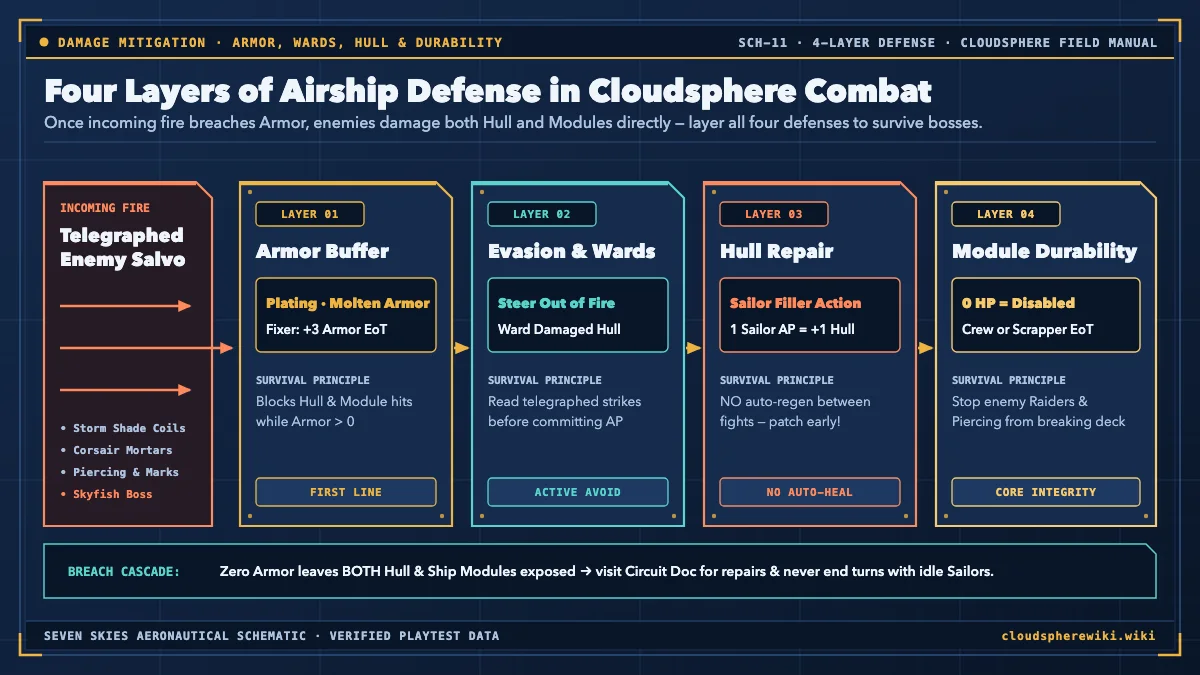
Module survivability in Cloudsphere follows a clear two-layer defense hierarchy (Verified Official, confirmed in Laki Studios' Deep Dive: Crewmates and Professions):
- Armor Absorbs First: As long as your ship holds Armor, incoming standard hits chip away at Armor rather than your structural Hull or mounted hardware. You can also ward damaged sections or physically steer your vessel out of telegraphed fire (Playtest / Demo-Observed).
- Zero Armor Exposes Hull and Modules: The moment enemy fire breaks through your remaining Armor, damage spills directly into your Hull—which does not regenerate automatically during a Cloudsphere run—and begins damaging your modules directly.
- Durability Zero = Disabled: Every module tracks its own Durability. Dropping to 0 Durability marks that module Disabled for the rest of the turn, taking its active function offline.
- Restoring Offline Hardware: You can spend a Crewmate's action to repair a Disabled module mid-turn, or rely on an end-of-turn Scrapper promotion to mend damaged parts automatically.
This durability loop cuts both ways across Cloudsphere combat. Just as enemies can disable your weapons once your plating cracks, offensive crew like Raiders (dealing 2 random direct damage to enemy modules at end of turn), Piercing damage, Marks, and Frontal Armor rams let you dismantle hostile ships—or strip armor off multi-part bosses like the Skyfish's torso and skull—before they can execute their deadliest turns.
Where Cloudsphere Modules Fit in Your Overall Run
Because Cloudsphere modules interact directly with crew bandwidth and ship temperature, avoid evaluating any single block in isolation:
- Check your Crew-to-Module ratio before adding another heavy weapon; an extra Damaged Crewmate from Astrid the Astronomer often adds more effective firepower than a third cannon you cannot afford to fire.
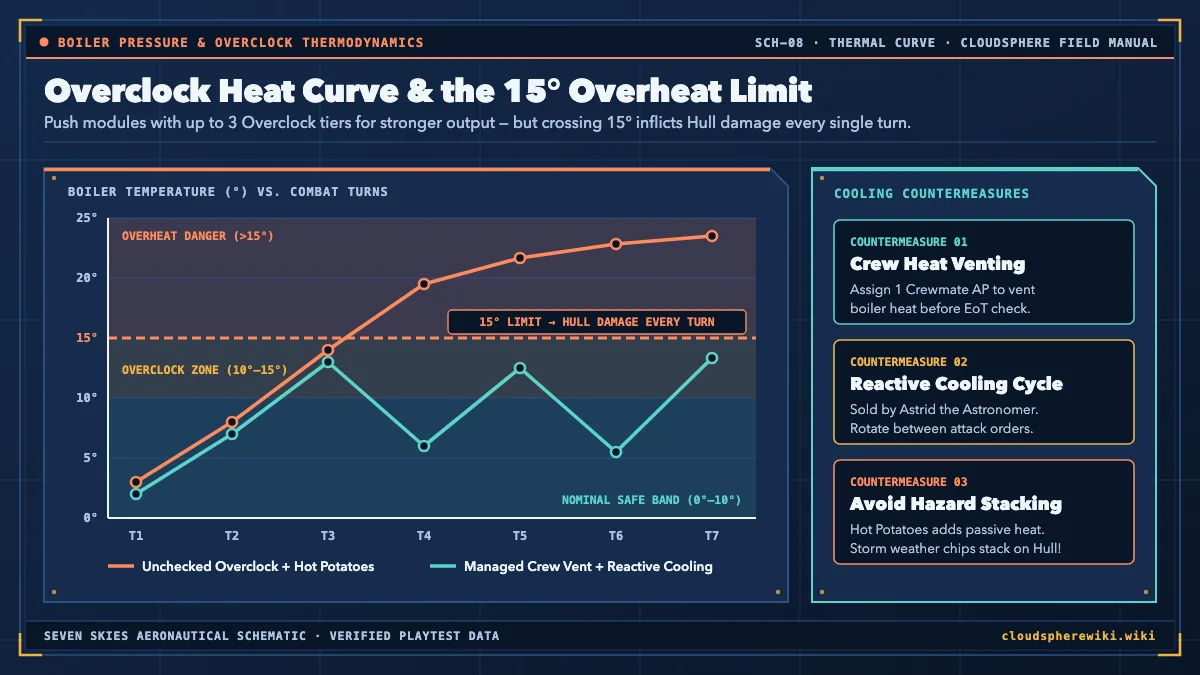
- Watch your Overclock and Heat budget before stacking high-output weapons alongside Hot Potatoes—learn the 15-degree threshold in Overclock and Heat.
- Looking for proven Playtest 2 module combinations and vendor priorities? Read our Best Airship Builds guide or start from fundamentals in the Cloudsphere Beginner's Guide.
Frequently Asked Questions
How does installing a module change my deck in Cloudsphere?
Verified Official: Every module installed on your sky-vessel physically modifies your airship and adds a corresponding Captain's Order card to your combat deck. Removing or swapping a module changes both your hull layout and the cards you draw during battle.
Does physical module placement on the airship grid actually matter?
Playtest / Demo-Observed: Yes. Adjacent weapons and utility modules can buff one another through adjacency synergies, and defensive blocks must be positioned where enemy attacks actually land. You can pull modules off and re-slot them between encounters to optimize layout.
What happens when a module loses all its Durability?
Verified Official: Every module has Durability. When incoming damage or a self-disabling effect drops a module's Durability to 0, it becomes Disabled for the rest of the turn until a Crewmate or an end-of-turn Scrapper repair brings it back online.
Are Cargo blocks dead weight on the airship grid?
Playtest / Demo-Observed: No. Cargo items occupy grid space but provide passive run value or mechanical hooks rather than empty bloat—for example, Gold Chest adds passive economic value, while Hot Potatoes passively generates ship Heat.
Can enemy attacks destroy my modules through Armor?
Verified Official: Armor protects your ship first, but once incoming damage breaks through and leaves you at zero Armor, attacks damage your Hull and can strike your modules directly. (In Playtest builds, Piercing damage also interacts with module Durability.)
Continue Reading
Cloudsphere Crew Guide: Action Points & Professions
Breakdown of Cloudsphere's confirmed Crewmate system: Sailors as action points, Fixer, Raider, and Scrapper promotions, and Afterimages.
Cloudsphere Overclock Guide: Heat Limits & Cooling
Complete breakdown of Cloudsphere's Overclock and Heat mechanics: upgrading modules at Overclock nodes, managing the 15-degree overheat Hull damage t…
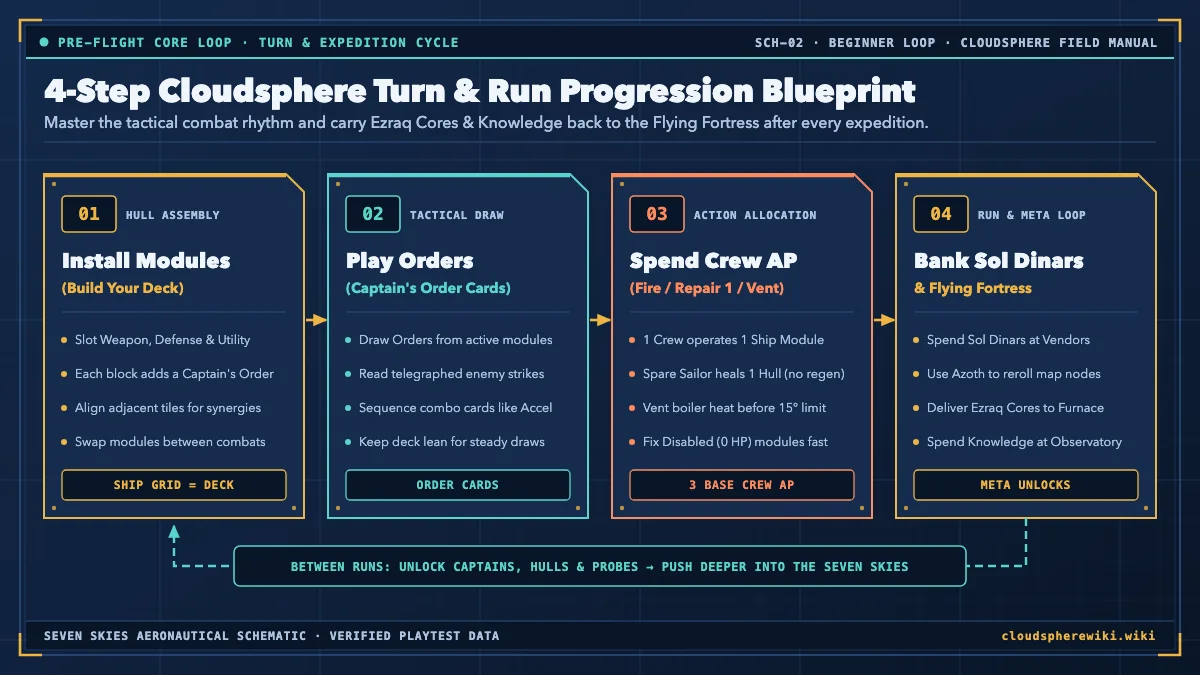
Cloudsphere Beginner's Guide: Combat & Survival Tips
Practical first-run survival guide for Cloudsphere by Laki Studios, covering Captain's Orders, Sailor hull repairs, heat limits, Sol Dinar economy, a…
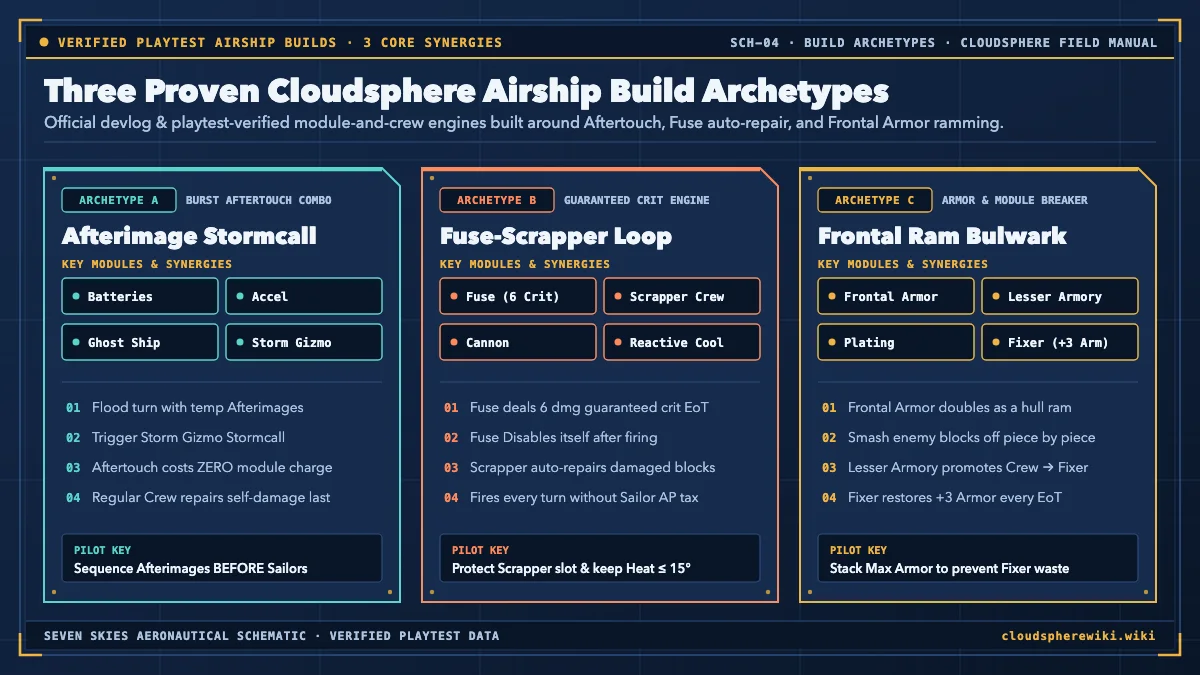
Cloudsphere Best Airship Builds & Module Synergies
Four verified Cloudsphere airship build archetypes combining official Laki Studios Crewmate synergies and playtest-tested module loadouts, grid posit…