Hull Spec Plaque
- Game
- Cloudsphere (Laki Studios)
- Genre
- Single-player Roguelike Airship Deckbuilder
- Verified Build
- Steam Playtest 2 & GOG Demo (Windows PC)
- Starting Crew
- 3 Crewmates (Playtest-observed)
- Overheat Limit
- Above 15 degrees deals Hull damage per turn
- Meta Hub
- Flying Fortress (Furnace & Observatory)
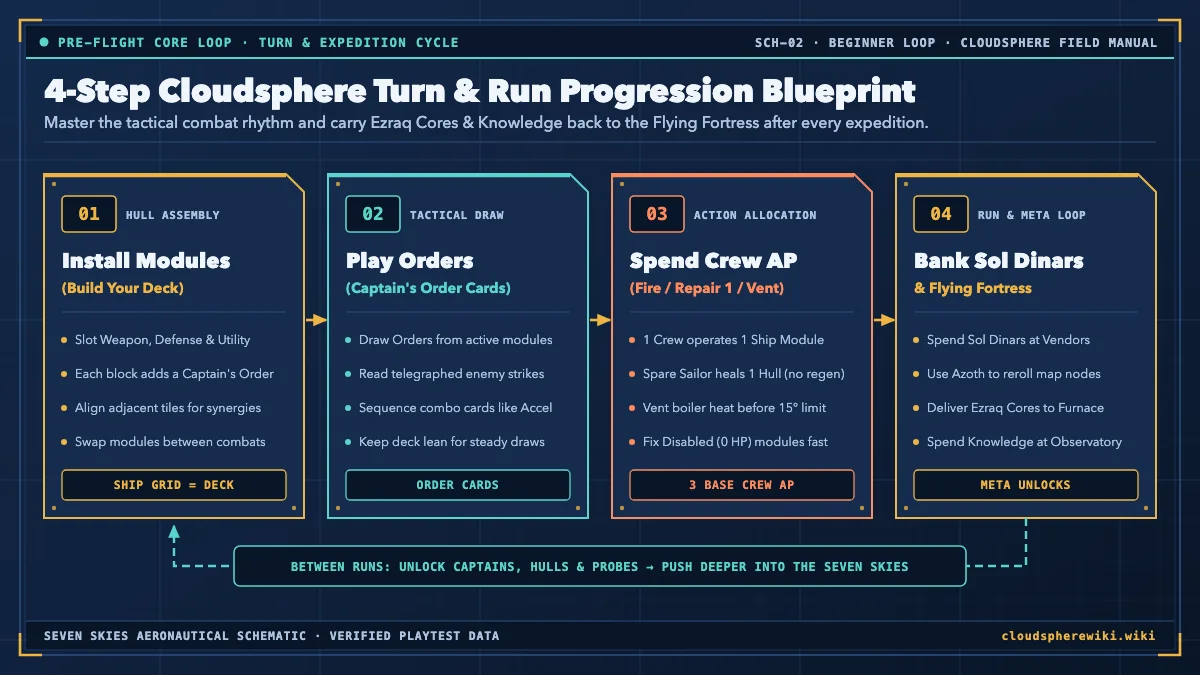
Getting started in Cloudsphere, the roguelike airship deckbuilder from Laki Studios (creators of Oaken), requires shifting how you think about both deckbuilding and ship management. If you arrived here from search, note that this Cloudsphere guide covers Laki Studios' Windows PC video game—not the Cloudspire board game and not CloudSphere IT multi-cloud governance software. Instead of drafting disconnected cards into an abstract draw pile, every block you bolt onto your vessel adds a Captain's Order card to your deck, while your crew controls how many actions you can execute each turn.
The strategies and Cloudsphere tips in this Cloudsphere beginner's guide combine verified official mechanics from Laki Studios' store listings and October 2026 devlog with hands-on Playtest 1, Playtest 2, and GOG Demo observations. Numbers and shop pacing remain subject to change before 1.0 launch.
Understand the Core Loop: Your Ship Is Your Deck
Every Cloudsphere run sends your misfit robot crew across the Seven Skies to take revenge on the colossal sky leviathan Altul (named in pre-release developer interviews). Laki Studios summarizes Cloudsphere's core hook in one line: your deck is not a collection of cards, it is your ship.
Installing a weapon, defensive block, or utility module on your airship changes both your vessel and your combat deck by adding its Captain's Order card. In playtest builds, modules fit onto a tactical grid where adjacent blocks buff one another, and you can pull modules off and re-slot them between fights so armor sits where incoming attacks land.
| Module Category | Role on Your Ship | Playtest-Observed Examples |
|---|---|---|
| Weapons | Add attack Captain's Orders | Cannon, Tar Slingshot, Burner, Fuse |
| Defense | Protect Hull, guard modules, or ram foes | Plating, Frontal Armor, Molten Armor, Reinforced Decking |
| Utility | Vent heat, promote crew, trigger storm/Afterimage effects | Reactive Cooling, Storm Gizmo, Lesser Armory, Springboard, Batteries |
| Cargo | Grant passive run value or hazards | Gold Chest, Hot Potatoes, Box of Harpoons |
| Crew | Expand actions per turn | Damaged Crewmate, Lazy Crewmate |
For grid layout rules and module interactions, read the Cloudsphere Modules & Ship Deck Guide.
Essential Cloudsphere Tips: Armor, Hull, and Crew Action Points
New players most often lose early Cloudsphere runs by treating Hull like a self-healing buffer. Laki Studios confirmed in Deep Dive: Crewmates and Professions that Hull does not regenerate automatically during a run. Once damage breaks through your Armor, enemy attacks hit your Hull and damage individual modules directly.
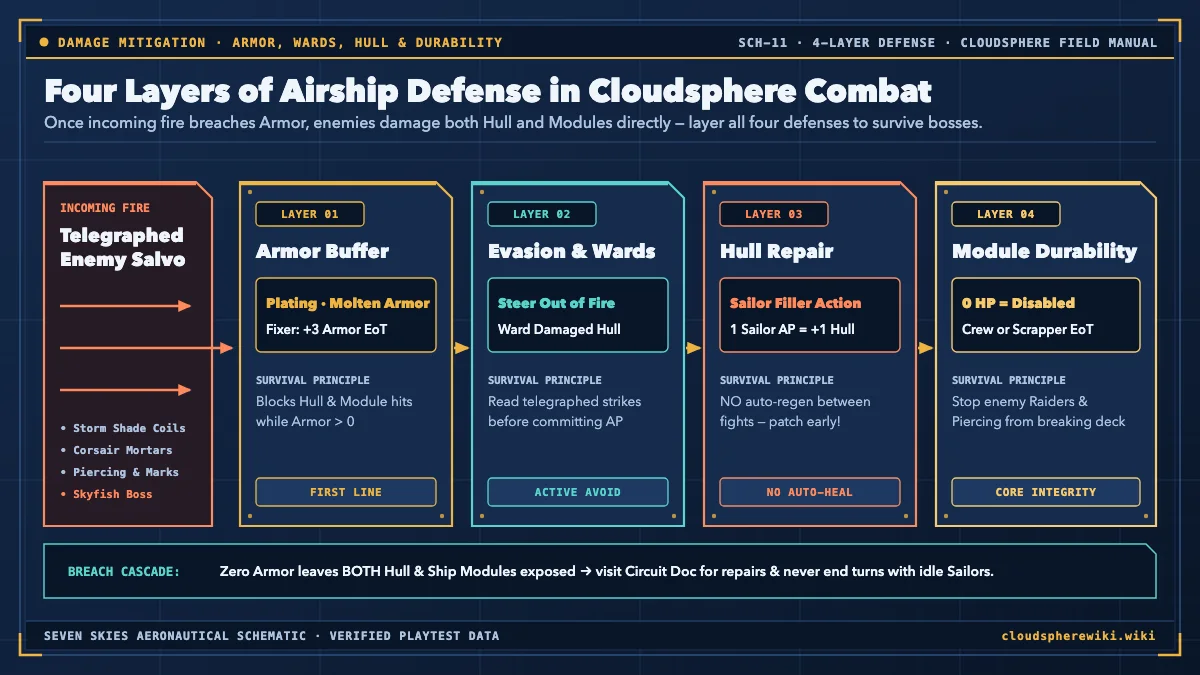
Apply these five Cloudsphere tips during every turn-based fight:
- Protect Armor before chasing lethal: Keep Armor intact so enemy fire cannot drop module Durability to 0. A module at 0 Durability becomes Disabled for the rest of the turn until a Crewmate repairs it.
- Spend leftover Sailors to repair Hull: Every basic Crewmate starts as a Sailor (playtests start with 3 crewmen). Besides operating modules (1 Crewmate per module), a Sailor can spend its action to repair 1 Hull. Patch Hull on safe turns before ending combat.
- Read telegraphs and maneuver: Playtest enemies telegraph their strikes. Beyond Armor, you can ward damaged hull sections, steer your airship out of incoming fire, or ram enemies with Frontal Armor to break off their modules.
- Plan for escalations and segmented bosses: Early skirmishes against Techno-Geezer teach turn pacing, while Storm Shade (storm coils, lightning rods) and Veteran Corsair (mortars, trebuchets, bows) test your defenses. Segmented bosses like Skyfish have separate destructible torso and skull parts whose Phase 2 behavior shifts once you strip their armor.
- Respect the 15-degree overheat limit: Weapons and Overclocks generate Heat. In playtest builds, climbing above 15 degrees deals structural Hull damage every turn. Vent heat with Crewmates, rotate Reactive Cooling, and watch Cargo like Hot Potatoes, which passively adds heat.
Master Crew Promotions (Fixer, Raider, Scrapper) and Afterimages in our Cloudsphere Crew & Action Points Guide, and check thermal rules in the Cloudsphere Overclock & Heat Guide.
Route Planning, Vendors, and Run Economy
Cloudsphere's branching beacon map (such as Shifting Tides in playtests) lets you spend resources to reveal hidden nodes and reshape paths ahead across shops, upgrades, Overclock nodes, cargo stops, treasure, and combats.
| Currency / Resource | How You Earn It | Best Way to Use It |
|---|---|---|
| Sol Dinars | Combats, treasure nodes, Value stacking | Buy modules, repair armor at Circuit Doc, roll at Rattlejaw the Gambler |
| Azoth | Earned during runs (sources subject to Playtest tuning) | Encounter rerolls on the map (confirmed by Laki Studios in Playtest 2) to skip off-plan stops and hunt key shops |
| Probes | Unlocked via Flying Fortress Observatory | Free rerolls in stores and on the route map |
| Ezraq Cores | Early battle rewards and bosses (Skyfish) | Install on your ship before the final beacon, or turn in at the Furnace |
| Scrolls / Knowledge | Clearing expeditions and runs | Spend on permanent Observatory constellations at base |
On November 26, 2026, Laki Studios developer theRunecrafter confirmed on Steam Discussions that the current playtest economy leans heavily on Value stacking (generating large Dinar pools) and that Azoth is intended for encounter rerolls. Visit Astrid the Astronomer for utility staples (Reactive Cooling, Storm Gizmo, Damaged Crewmate), Circuit Doc for armor repairs, Vashti the Vagabond for Cargo (Box of Harpoons), and Defense Vendors (Molten Armor, Reinforced Decking) or Rattlejaw the Gambler when rolling for high-tier defense blocks.
Flying Fortress Meta-Progression Between Runs
Even if the Skyfish, Whale, or sky corsairs end your run, your crew returns to the Flying Fortress hub. Story beats from Commander Ciro open permanent Cloudsphere progression across two core facilities observed in playtests:
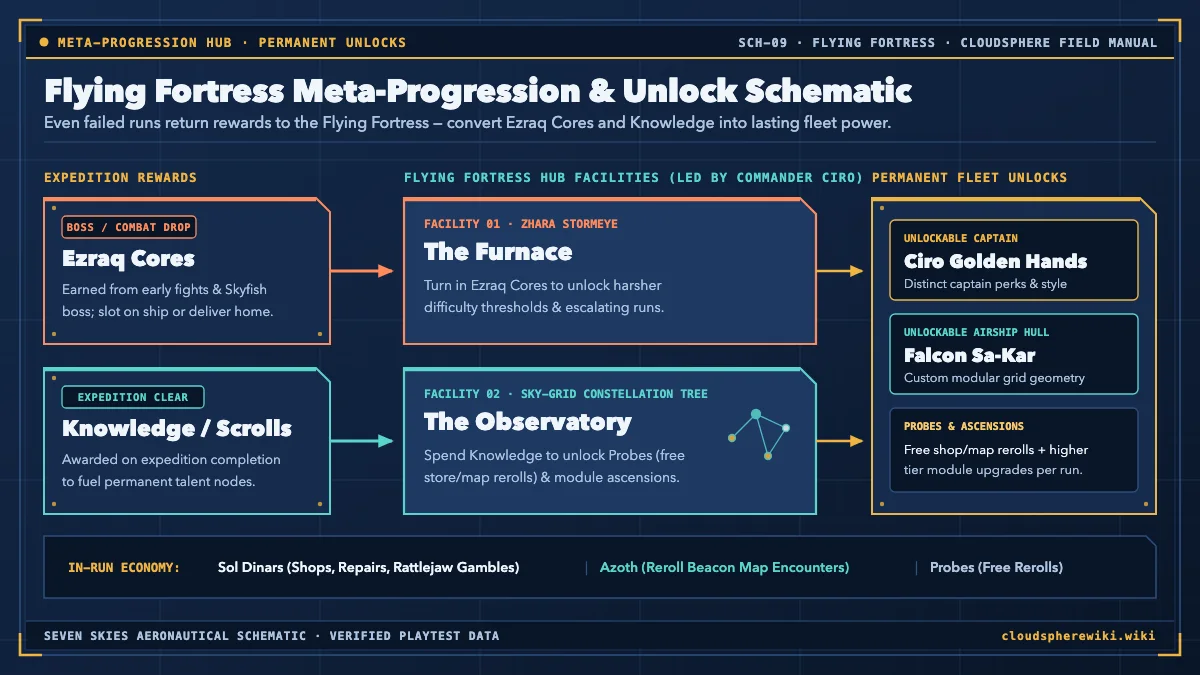
- The Observatory: Spend Knowledge points on a sky-grid constellation tree to unlock Probes and module ascensions.
- The Furnace: Staffed by Zhara Stormeye, who takes Ezraq Cores to unlock higher difficulty thresholds.
- Captains and Hulls: Meta unlocks grant new Captains like Ciro Golden Hands and alternate hulls such as Falcon Sa-Kar with fresh module grids.
First-Three-Runs Checklist
- Run 1 — Build repair habits: Keep your 3 Crewmates active, patch Hull with spare Sailors, and stay at or below 15 degrees of heat.
- Run 2 — Test a Profession: Draft Lesser Armory (Fixer, 3 Armor/turn) or Springboard (Raider, 2 enemy module damage/turn) to see how end-of-turn passives free your actions.
- Run 3 — Commit to a synergy: Use Observatory Probes and Azoth rerolls to assemble a focused loadout from our Cloudsphere Best Airship Builds Guide.
Still need to install Cloudsphere? Follow the Cloudsphere Release Date, GOG Demo & Steam Playtest 2 Guide for free Windows PC access, confirm your PC meets the Cloudsphere System Requirements (16 GB RAM, 4 GB storage), and keep this Cloudsphere guide handy for your next Seven Skies run.
Frequently Asked Questions
Why isn't my airship Hull healing after battles in Cloudsphere?
Confirmed by Laki Studios' official Crewmates deep dive, Hull does not regenerate automatically during a Cloudsphere run. You must spend leftover basic Sailors on their filler action to repair 1 Hull each, and keep Armor intact so enemy fire does not hit your Hull or modules directly.
How do Crewmates work compared to energy in other deckbuilders?
Every Crewmate acts as an Action Point. Operating a ship module normally costs 1 Crewmate, and the same pool must also cover Disabled module repairs, heat venting, and Sailor hull patches.
What should I spend Sol Dinars and Azoth on early in a run?
Use Sol Dinars on armor repairs at Circuit Doc, core ship modules that fit your grid, and strategic rolls at Rattlejaw the Gambler. Spend Azoth to reroll map encounters so you avoid off-plan stops and find shops that match your build.
Do I keep any progress if my airship is destroyed?
Yes. Even after a failed expedition in the Seven Skies, your crew returns to the Flying Fortress hub, where earned Knowledge points, Scrolls, and Ezraq Cores unlock permanent upgrades, new Captains, new ship hulls, and higher difficulty tiers.
How many Crewmates do you start with in Cloudsphere?
Playtest / Demo-Observed: Runs begin with 3 starting Crewmates acting as your turn-by-turn Action Points. You can expand your roster during an expedition through crew modules or vendor items such as Damaged Crewmate (sold by Astrid the Astronomer) and Lazy Crewmate.
Continue Reading
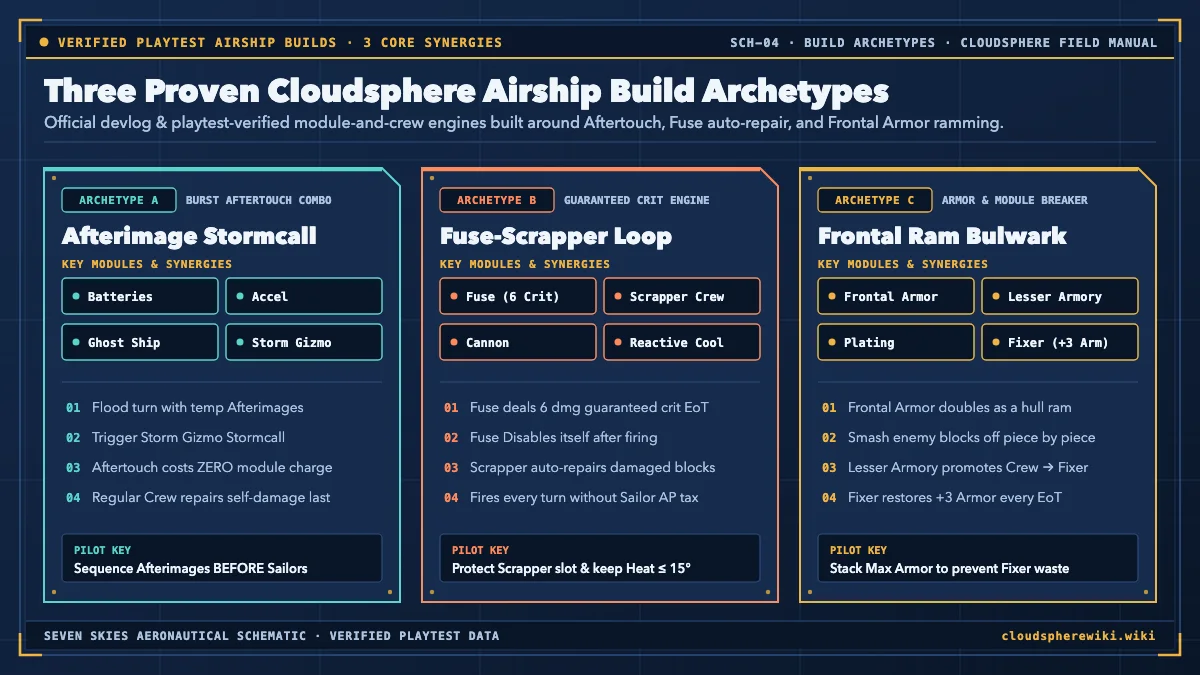
Cloudsphere Best Airship Builds & Module Synergies
Four verified Cloudsphere airship build archetypes combining official Laki Studios Crewmate synergies and playtest-tested module loadouts, grid posit…
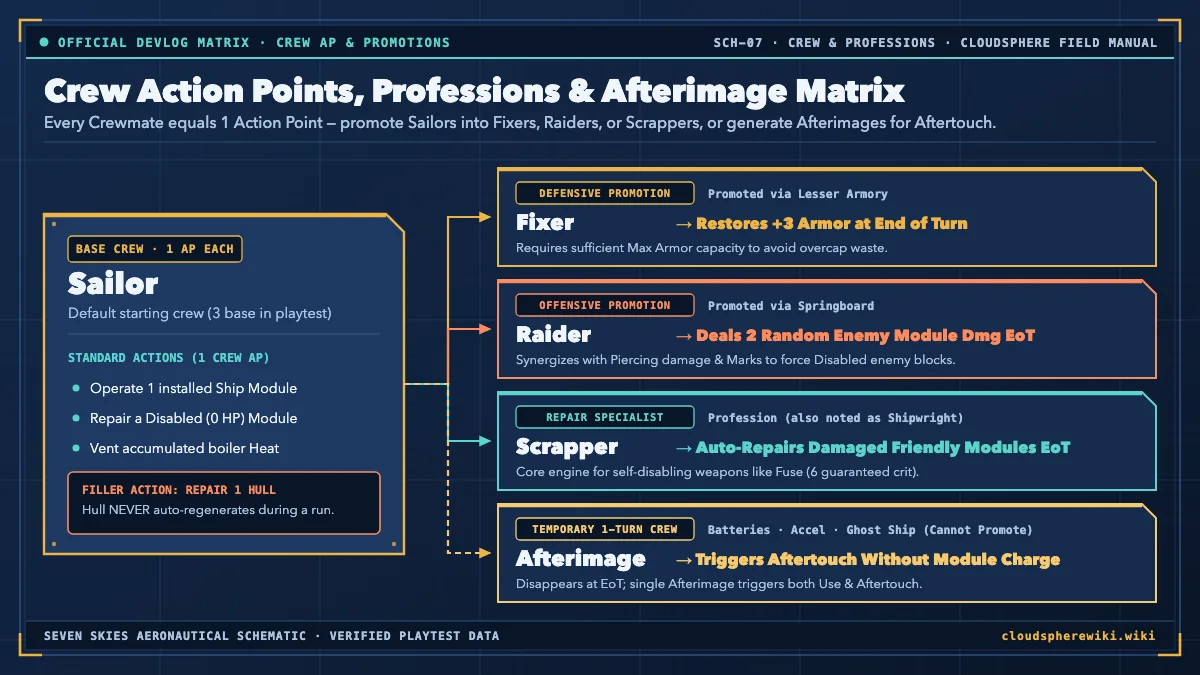
Cloudsphere Crew Guide: Action Points & Professions
Breakdown of Cloudsphere's confirmed Crewmate system: Sailors as action points, Fixer, Raider, and Scrapper promotions, and Afterimages.
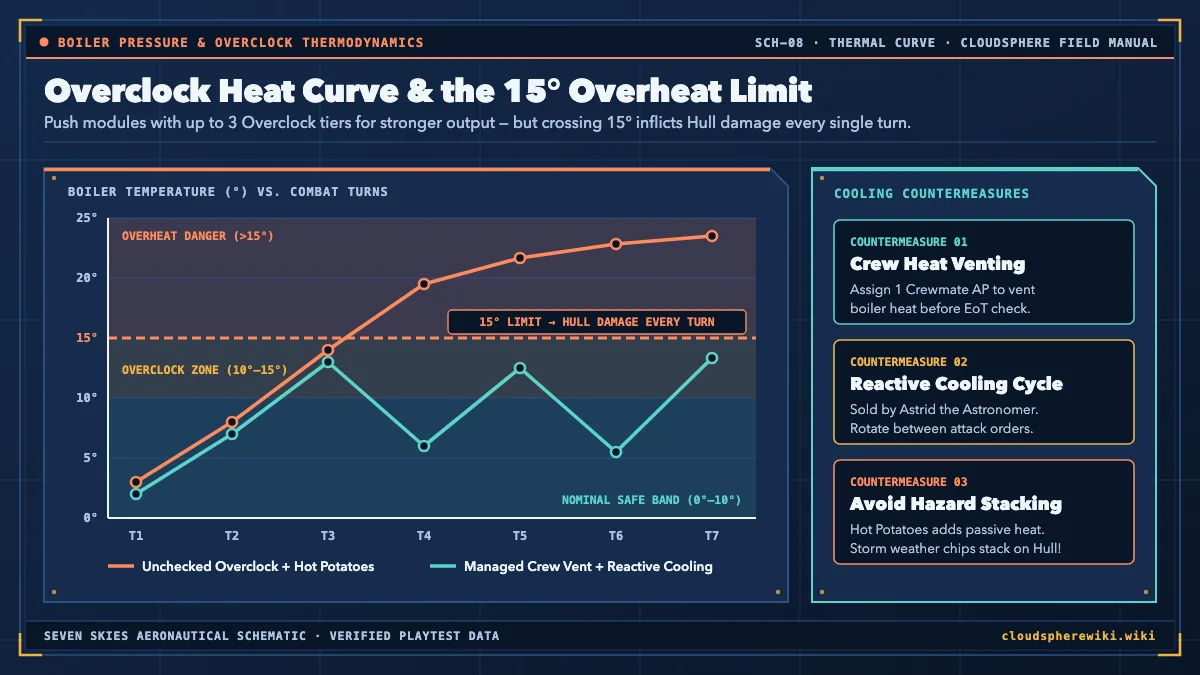
Cloudsphere Overclock Guide: Heat Limits & Cooling
Complete breakdown of Cloudsphere's Overclock and Heat mechanics: upgrading modules at Overclock nodes, managing the 15-degree overheat Hull damage t…
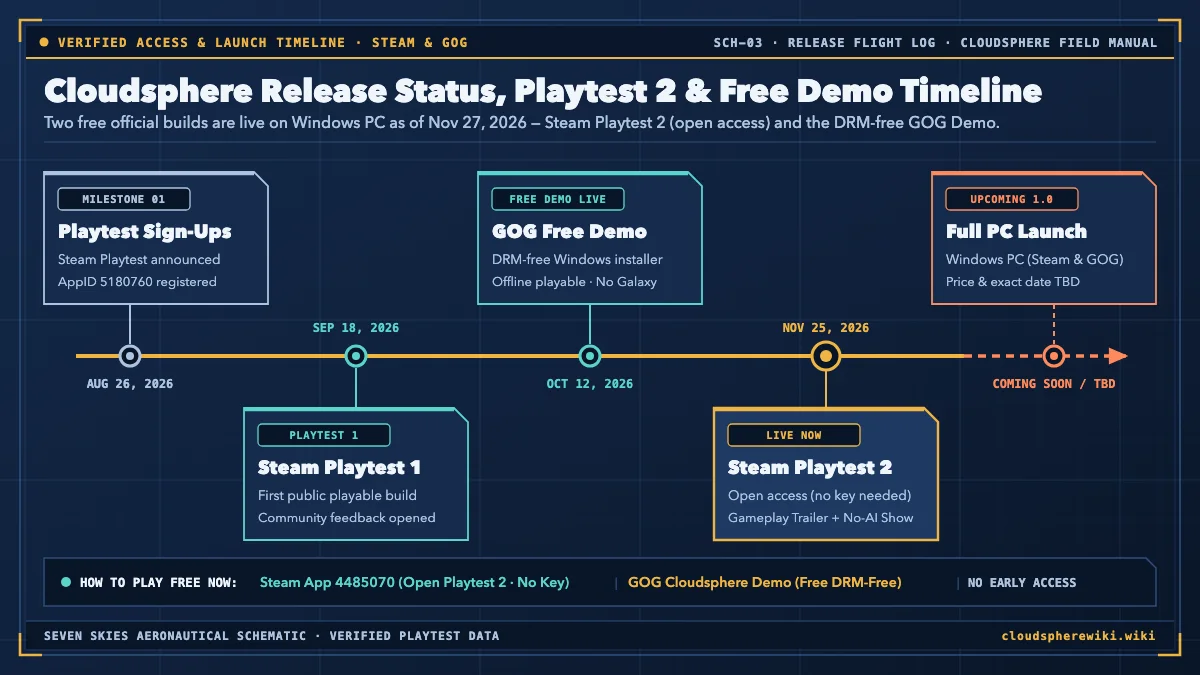
Cloudsphere Release Date, GOG Demo & Steam Playtest 2
Verified release date status, Steam Playtest 2 open-access instructions, DRM-free GOG Demo download details, and development timeline for Cloudsphere…