Hull Spec Plaque
- System Role
- Risk-reward module power scaling vs. structural Heat (Verified Official)
- Overheat Threshold
- Above 15 degrees = Hull damage every turn (Playtest / Demo-Observed)
- Upgrade Nodes
- Overclock nodes on the branching route map (Verified Official)
- Primary Cooling
- Crewmate heat venting & Reactive Cooling module (Playtest-Observed)
- Cooling Vendor
- Astrid the Astronomer (sells Reactive Cooling)
- Compounding Hazards
- Hot Potatoes cargo passive & Storm weather chip damage
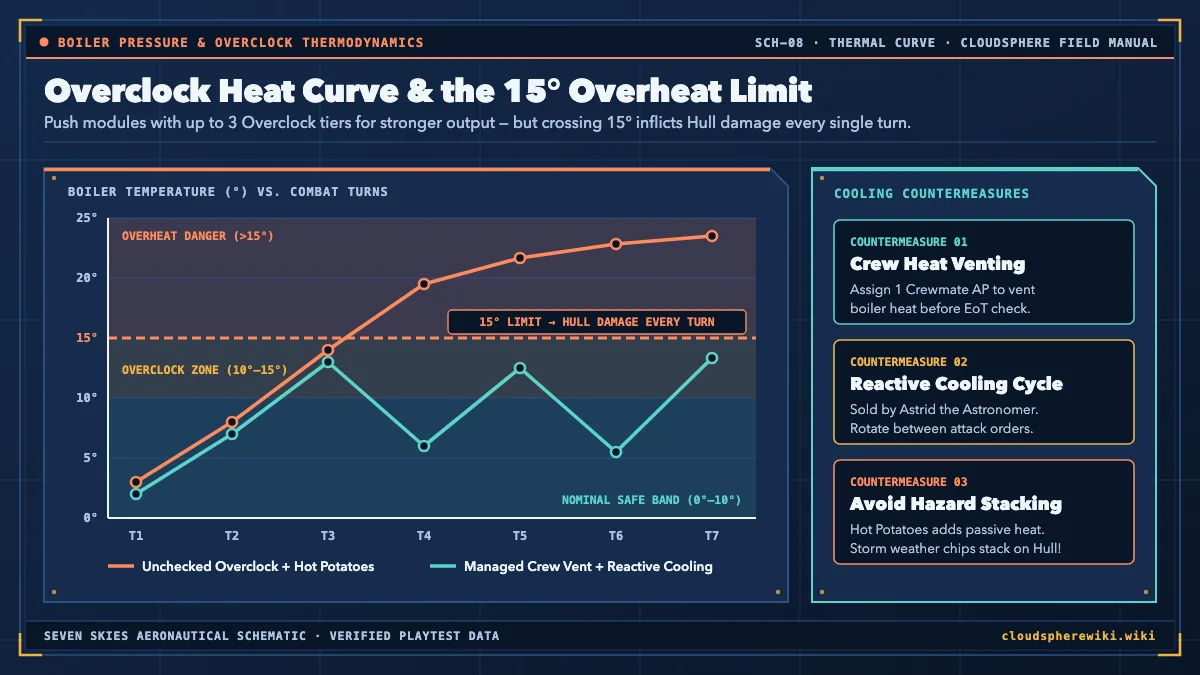
The Cloudsphere overclock system is one of the defining pillars of Laki Studios' roguelike airship deckbuilder (not to be confused with PC hardware overclocking or the Cloudspire board game). As the official Cloudsphere Steam description puts it, captains are encouraged to "push overclocks to the limit"—supercharging individual ship modules for outsized combat output while flirting with a thermal ceiling that can cook your own hull from the inside.
Below is how Cloudsphere overclock upgrades, the 15-degree overheat threshold, cooling rotations, and environmental hazards interact in the Steam Playtest 2 and GOG Demo builds.
What Cloudsphere Overclock Nodes Do to Your Airship
On Cloudsphere's branching overworld beacon map, Overclock nodes compete directly with Shops, Upgrades, Cargo stops, and Combat encounters for your route choices and resources (Verified Official). Choosing to Overclock a module in Cloudsphere transforms a standard block into a high-risk centerpiece (Playtest / Demo-Observed):
- Higher Power and Unique Effects: Overclocking pushes a Cloudsphere module beyond baseline performance, granting stronger output or upgraded mechanical effects. Community and developer previews note that modules can be pushed across multiple overclock tiers (up to three times in previewed builds).
- Mandatory Heat Tax: Every burst of overclocked power comes with a thermal cost. Firing weapons and triggering overclocked modules drives your Cloudsphere airship's temperature gauge upward during combat.
- Route Economy Tradeoff: Because Azoth lets you reroll encounters on the Cloudsphere map (Verified Official Dev Reply) and Probes unlocked at the Observatory offer free rerolls (Playtest / Demo-Observed), Overclock nodes are best hunted once your ship already has a clear win-condition weapon or utility block worth amplifying—not blindly on turn one with an under-armored hull.
The 15-Degree Overheat Threshold
In Cloudsphere playtest builds (Playtest / Demo-Observed), ship temperature is forgiving up to a strict mechanical line and punishing the moment you cross it:
| Thermal Zone | Ship Status | Practical Combat Consequence |
|---|---|---|
| At or Below 15° | Safe operating range | Full module output with no thermal Hull penalty |
| Above 15° (Overheating) | Critical thermal breach | Structural Hull damage every turn until cooled back down |
Why does a few points of recurring Hull damage matter so much? Because in Cloudsphere, Hull does not regenerate automatically during a run (Verified Official). Unlike Armor—which you can replenish every fight through plating blocks, Fixer promotions, or paid Armor repairs at Circuit Doc—every point of Hull burned by overheating stays missing until you spend basic Sailor filler actions (+1 Hull repair each) or find dedicated repair opportunities during your run.
Running hot for a single decisive turn to finish a Cloudsphere boss like the Skyfish can be a smart calculated gamble. Staying above 15 degrees across a drawn-out skirmish against a Storm Shade or Veteran Corsair quickly drains the exact Hull margin you need for the final beacon.
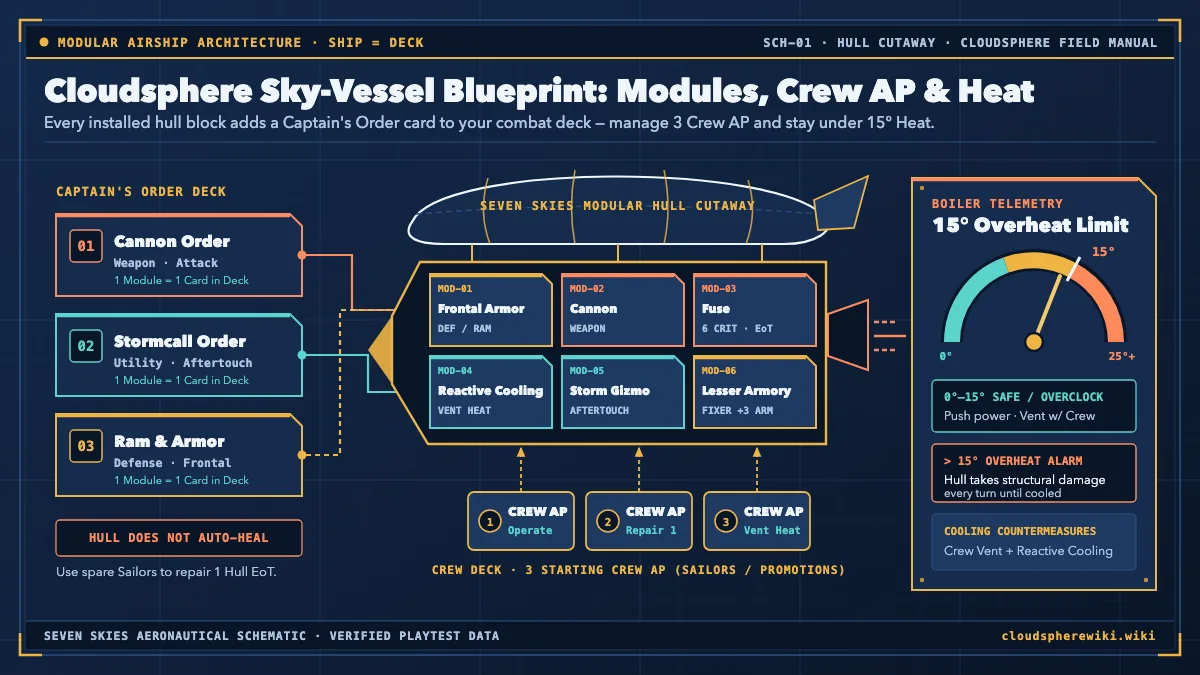
How to Cool Down: Crew Venting vs. Reactive Cooling
Keeping an overclocked Cloudsphere sky-vessel below 15 degrees relies on two complementary cooling methods (Playtest / Demo-Observed):
- Assign Crewmates to Vent Heat: Any available Crewmate can be spent to vent accumulated Heat directly. This requires zero grid space and is always accessible in an emergency, but it taxes your Action Points—every hand venting heat is one fewer cannon shot, shield activation, or Disabled-module repair.
- Slot Cooling Hardware (Reactive Cooling): Dedicated utility modules such as Reactive Cooling, stocked by Astrid the Astronomer, add repeatable cooling directly into your turn cycle. By rotating Reactive Cooling between weapon Captain's Orders, you keep offensive pressure up without sacrificing your entire crew roster to emergency venting.
Because Cloudsphere overclock setups climb in temperature fast, adding utility cooling blocks is a deckbuilding decision as much as a survival one. Check Modules and the Ship Deck to see how Utility blocks compete for space with Weapons and Defense, and see Crew and Action Points for how Afterimages from Batteries or Accel can absorb the action-point cost of venting during burst turns.
Cargo Passives, Storms, and Compounding Damage
Thermal management in Cloudsphere rarely happens in a vacuum. Two additional playtest interactions (Playtest / Demo-Observed) can push a borderline build over 15 degrees faster than expected:
- Heat-Generating Cargo (
Hot Potatoes): Cargo modules in Cloudsphere are not empty ballast. Items such as Hot Potatoes passively generate Heat during combat. If you pick up heat-producing cargo for its synergy or run value, factor that passive temperature climb into your turn-by-turn ceiling before stacking another Overclock upgrade. - Weather and Storm Stacking: Violent storms across Cloudsphere's Seven Skies—and storm-generating encounters or Stormcall effects—chip away at health across multiple turns and affect both vessels. Letting Heat climb past 15 degrees during an active storm stacks two simultaneous damage-over-time clocks on your Hull, turning a manageable fight into a run-ender.
Practical Cloudsphere Overclock Rules of Thumb
- Solve Cooling Before Stacking Multiple Overclocks: Visit Astrid the Astronomer for Reactive Cooling or expand your Cloudsphere crew roster before pushing a weapon to maximum thermal output.
- Save the Redline for Lethal Turns: Pushing past 15 degrees is easiest to justify on the turn you destroy the enemy ship, cutting off future thermal ticks before they accumulate.
- Keep a Basic Sailor Available: Even in well-cooled Cloudsphere builds, one unpromoted Sailor lets you patch stray Hull ticks at the end of quiet turns.
For full archetype setups that balance Overclock firepower with Armor and Crew economy, continue to Best Airship Builds or review first-run priorities in our Cloudsphere Beginner's Guide.
Frequently Asked Questions
What happens if my airship overheats in Cloudsphere?
Playtest / Demo-Observed: Firing weapons and running overclocked hardware raises your vessel's temperature. Once Heat climbs past 15 degrees, your airship suffers structural Hull damage every turn until you cool back down.
How do you cool down an overheating ship in Cloudsphere?
Playtest / Demo-Observed: You have two primary tools—assign Crewmates to vent accumulated Heat directly (spending their action for the turn), or install and cycle dedicated cooling hardware such as Reactive Cooling between your attack orders.
Where can I get Reactive Cooling during a run?
Playtest / Demo-Observed: Reactive Cooling is a Utility module sold by Astrid the Astronomer, the utility shop vendor who also stocks Storm Gizmo and Damaged Crewmate.
Why is Overheat Hull damage so dangerous compared to normal enemy hits?
Verified Official + Playtest-Observed: Hull does not regenerate automatically between fights in Cloudsphere. Taking avoidable thermal Hull damage every turn drains permanent run health and forces your basic Sailors to spend actions repairing Hull instead of attacking or building Armor.
Do Cargo items or Storms interact with Heat damage?
Playtest / Demo-Observed: Yes. Certain Cargo blocks like Hot Potatoes passively generate Heat during combat, while violent Weather and Storm encounters chip away at both ships over multiple turns—stacking directly on top of overheating damage if left unmanaged.
Continue Reading
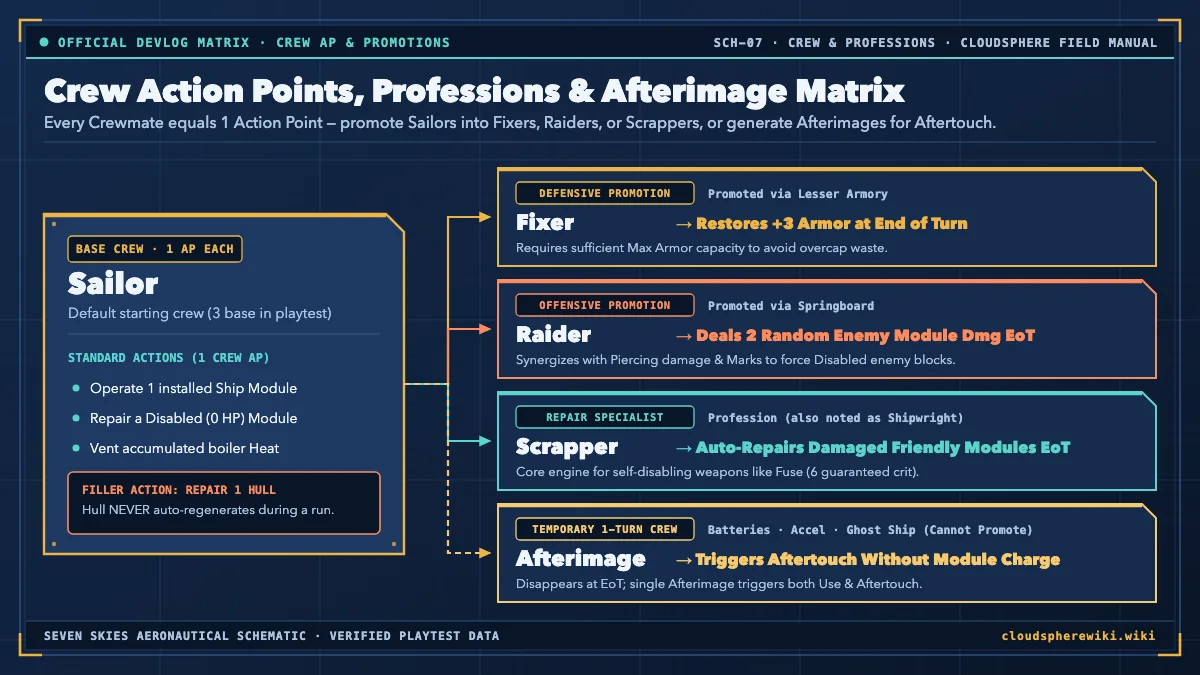
Cloudsphere Crew Guide: Action Points & Professions
Breakdown of Cloudsphere's confirmed Crewmate system: Sailors as action points, Fixer, Raider, and Scrapper promotions, and Afterimages.
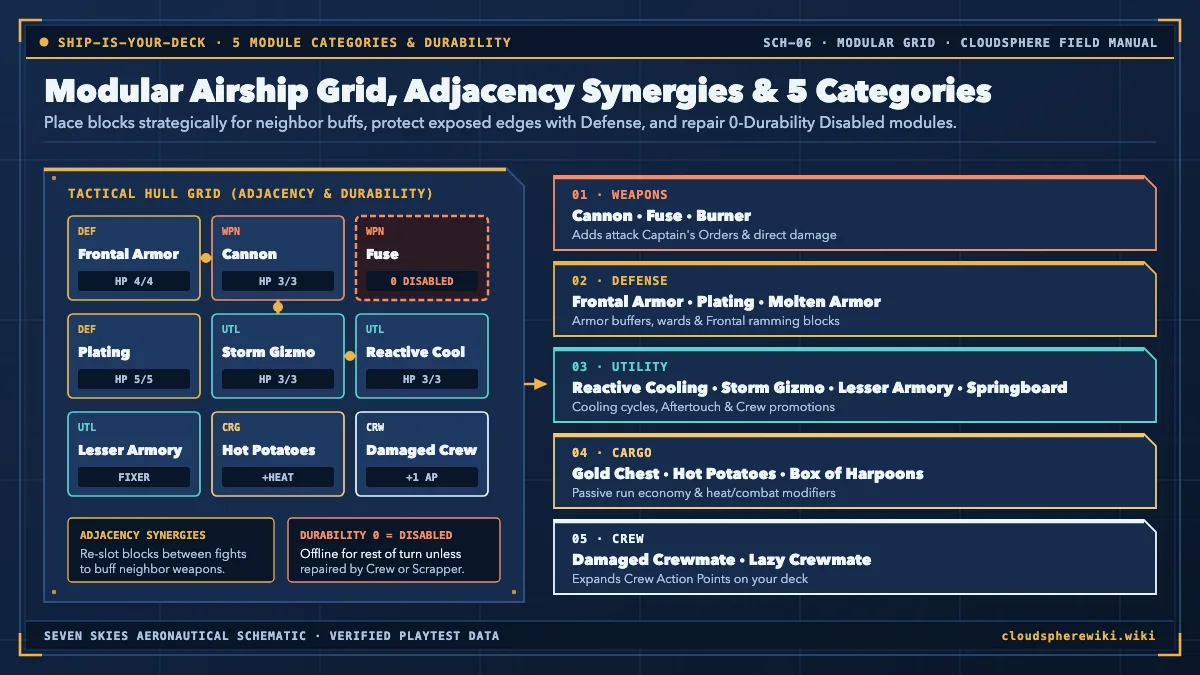
Cloudsphere Modules Guide: Your Airship Is Your Deck
How Cloudsphere's modular airship grid doubles as your combat deck, covering the five module categories, Captain's Order cards, adjacency synergies,…
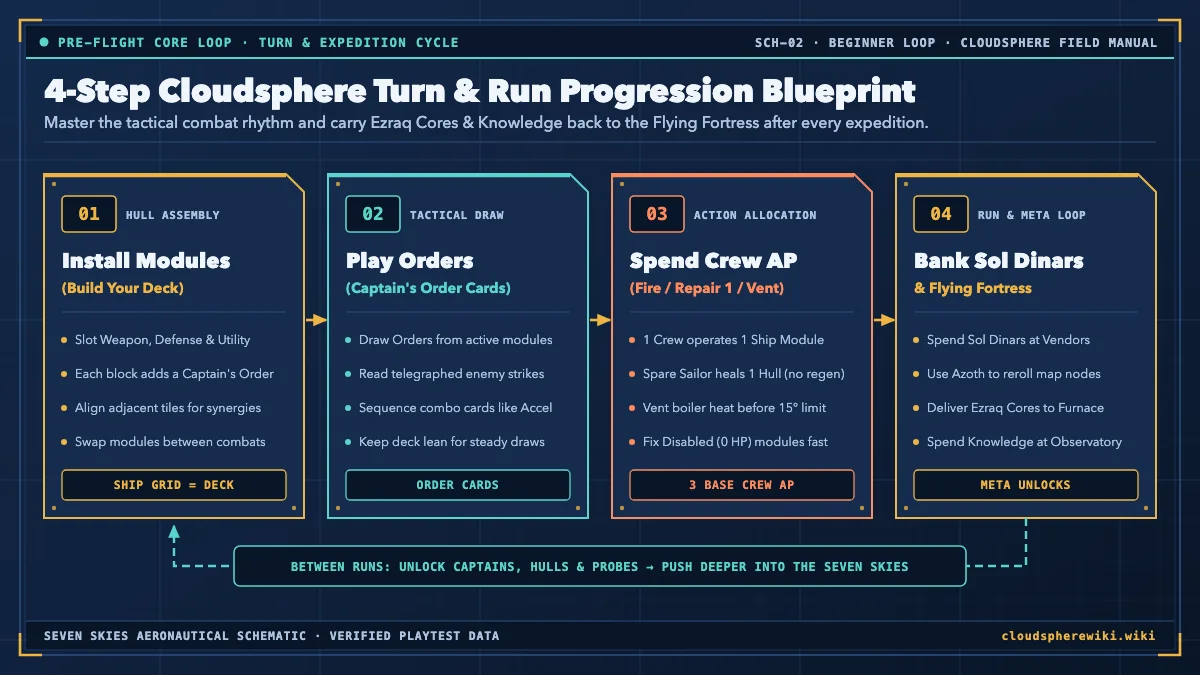
Cloudsphere Beginner's Guide: Combat & Survival Tips
Practical first-run survival guide for Cloudsphere by Laki Studios, covering Captain's Orders, Sailor hull repairs, heat limits, Sol Dinar economy, a…
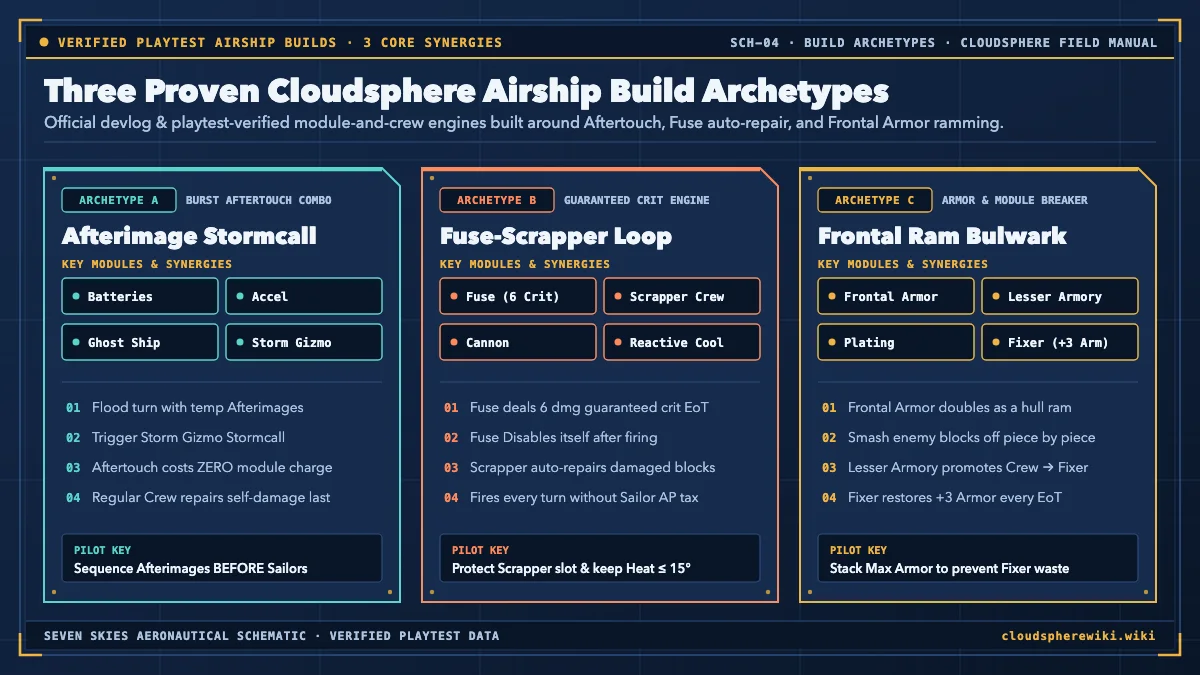
Cloudsphere Best Airship Builds & Module Synergies
Four verified Cloudsphere airship build archetypes combining official Laki Studios Crewmate synergies and playtest-tested module loadouts, grid posit…